Douyin is a famous Chinese social media service where users can create, share and discover interactive content in short-video form. Although Douyin is known as a China’s version of TikTok for the same developer (ByteDance) and similar design, they are separate apps with different content. Douyin is especially made for Chinese users and focuses on Chinese local trends.
Nowadays, more and more people outside China show their interests in Douyin and attempt to download Douyin videos for various reasons, such as, offline watching, content inspiration and so on. How to download Douyin videos? This article lists several possible ways that let you save videos from Douyin without watermark while keeping original quality.
Disclaimer: We DO NOT suggest downloading any copy-protected Douyin video for distribution, commercial and illegal use.
Can You Download Douyin Videos
Theoretically, a few videos are available for downloading if the creator allows. It is a direct solution but watermarks are often attached for copyright protection. In most times, you can't find a "save" option or the like at all.
Luckily, there are some alternative ways leading you to download Douyin videos without watermark and creators' permission, from third-party tool to screen recording. Next, follow us and achieve Chinese TikTok video download with no effort.
Way 1: Download Douyin Videos Using Online Video Downloader
Online video downloader simplifies the process to save streaming videos into local files in spite of restrictions. SnapDouyin is that of tool capable of downloading Douyin video without watermark for free. It is compatible with all browsers so that you can save desired content to computers and phones.
Simply input the Douyin video link. Then, let SnapDouyin to complete the download task.
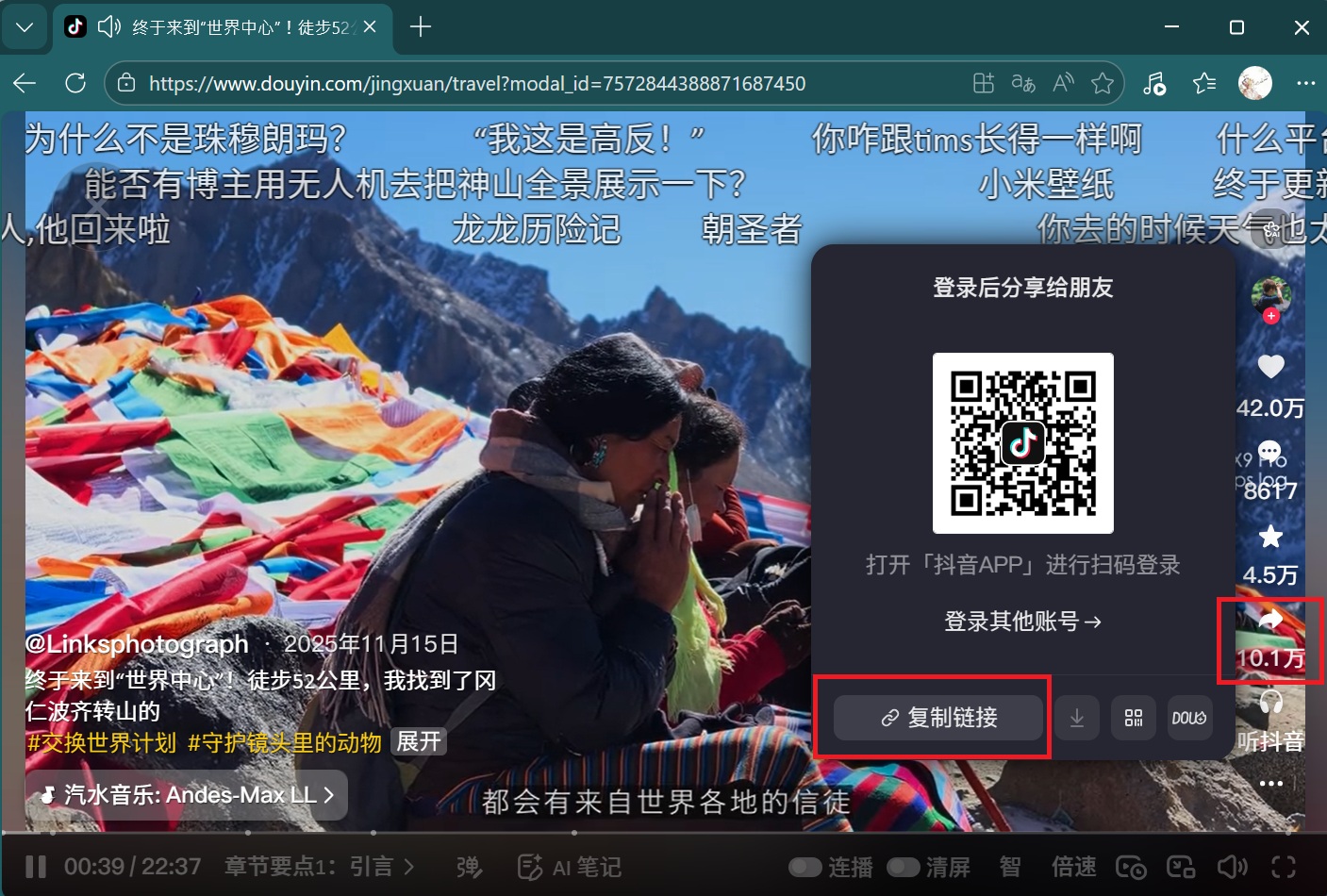
Step 1. Visit douyin.com or open the Douyin app. Select the video you want to download. Click Share and tap on the link icon to copy the URL.
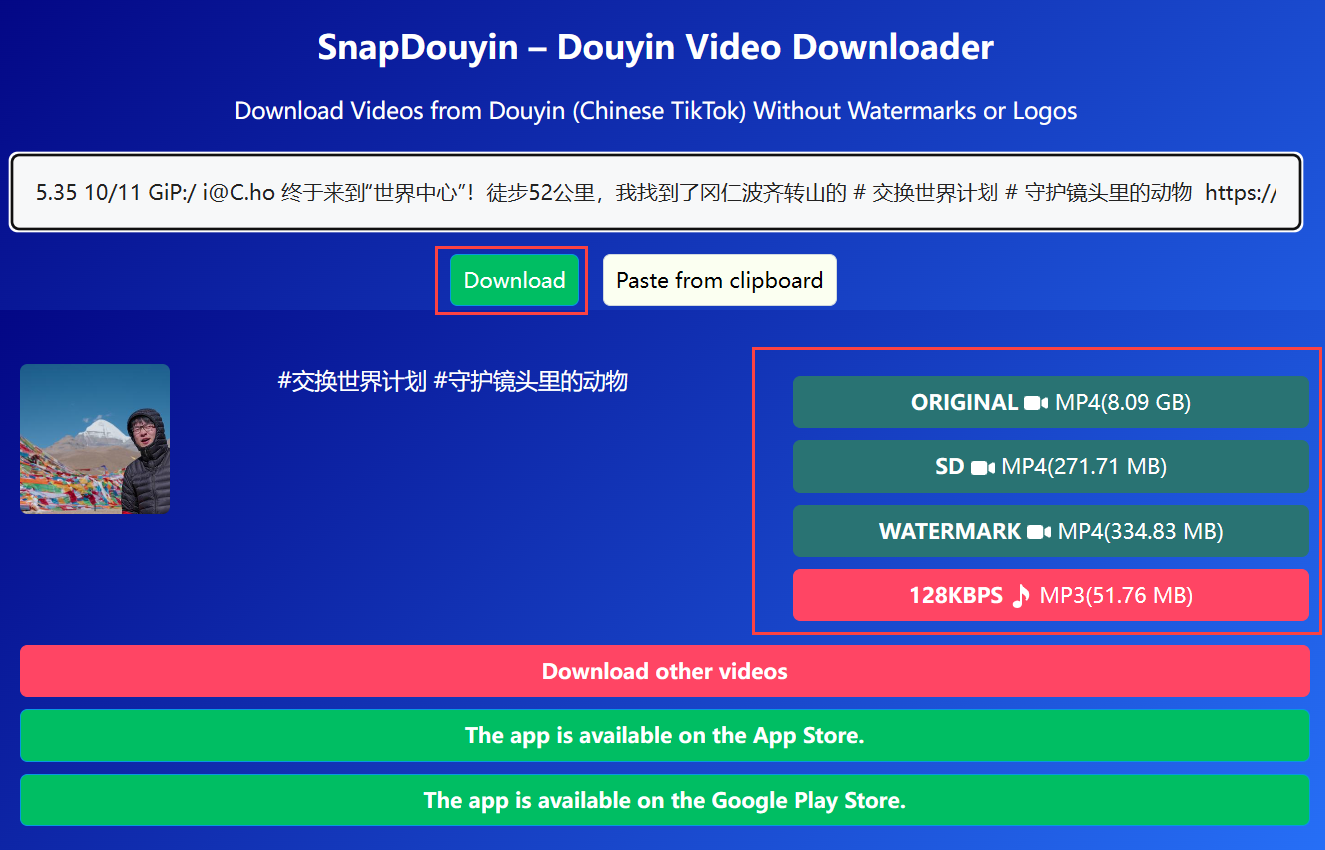
Step 2. Go to snapoudyin.app in your browser. Paste the copied URL to the textbox.
Step 3. Click Download. The app will automatically analyze the video and gives several download options.
Step 4. Select an option - original, HD, watermark in MP4 or extract MP3 soundtrack. Seconds later, you can get the video downloaded to your device.
Why use SnapDouyin: It is a web-based service ensuring easy and fast Douyin video download on different devices, PC, Mac, iPhone and Android, no need to log in your account and no extra installation.
Why not use SnapDouyin: Ads and popups appear anywhere, not limited to the webpage, but everytime when you click the Download button. What's worse, sudden shutdown may happen for copyright infringement.
Way 2: Download Donyin Videos with Browser Developer Tools
Developer Tools, or DevTools, are built-in features in browsers that enable developers examine HTML pages to identify issues and improve user experience. Any element (video file included) on a page is accessible through Developer Tools, that makes it possible to download embedded videos from Douyin and other platforms.
How to download Douyin videos via Developers Tools? Follow the steps.
Step 1. Open douyin.com in your browser and play a video you want to download. Press F12 on your keyboard to enter Developer Tools.
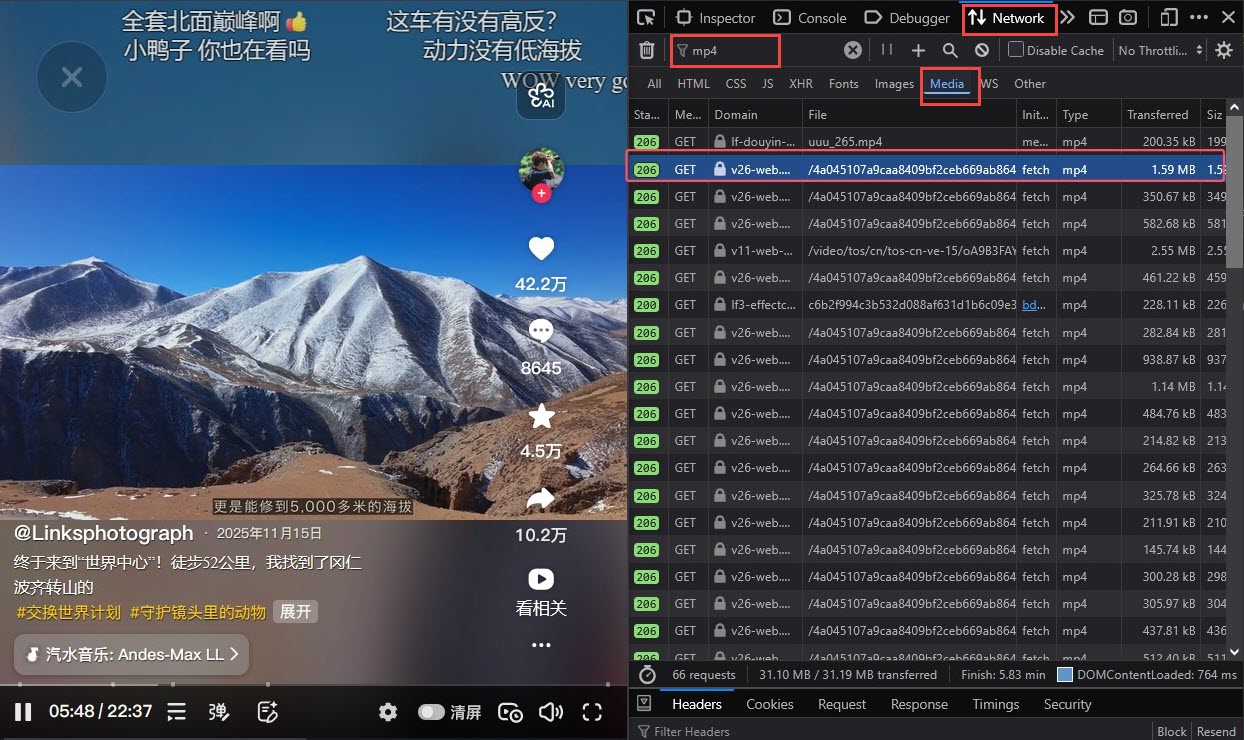
Step 2. Select Network > Media. Input "mp4" in the filter area.
Step 4. Refresh the page and play the video. Find a file with a .mp4 extension and large size in the list.
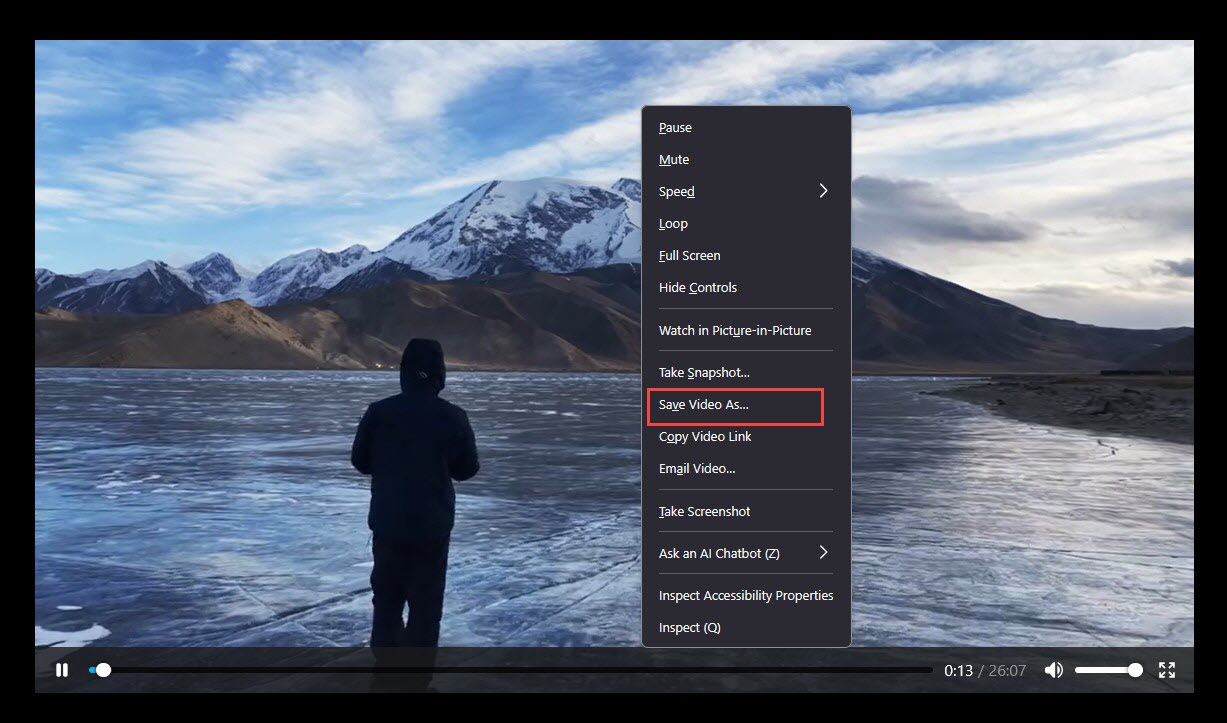
Step 5. Double click the file to open it. Right-click the video and select "Save video as..." to download video from Douyin.
Why use Developer Tools: 100% safe and clean, no login, no third-party tools or installations.
Why not Developer Tools: It is a bit complex for beginning to download Douyin videos via Developer Tools. And, you may fail to save protected videos.
You May Like: Twitter GIF Downloader: HD Twitter GIF Download Free Online/Extension/Mobile >>
Way 3: Download Donyin Videos by Screen Recording
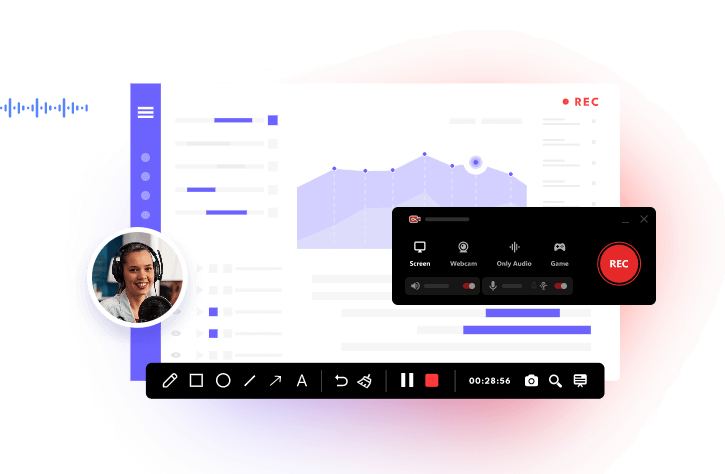
Screen recording is another workable way to download Douyin videos, ensuring higher success rate to rip wanted content. iTop Screen Recorder is an industry-leading free screen recorder for PC with the ability to capture playing content on desktop while maintaining original quality.

Record Live and Streaming Videos in One Click
- Record TV shows, movies, live sports from any site.
- Record videos and live streams without quality loss.
- Record from YouTube, Netflix etc., without black screen.
- Record with mic/webcam to create reaction videos.
iTop Screen Recorder delivers seamless recording experience. You can not only save the video with audio from Douyin, but capture all details on the page, from bullet screens to comments. It ensures studio-quality results, featuring polished images and clear sounds. The settings empower you to adjust video/audio parameters, like resolutions, bit rate, frame rate, etc., to achieve optimized outputs. "Enhanced Mode" helps you bypass black screen issue when screen recording protected videos, while "Hardware Acceleration" guarantees no-lag workflow even though you are trying to a 4K or 120fps video.
The screen recorder> has an easy-to-navigate interface that walks you through getting started with it quickly and easily. Also, the guide below lets you learn how to download Douyin video by screen recording more clearly.
Step 1. Download the free screen recorder on Windows. Double click the .exe file to install it.
Step 2. Play the Douyin video you want to record.
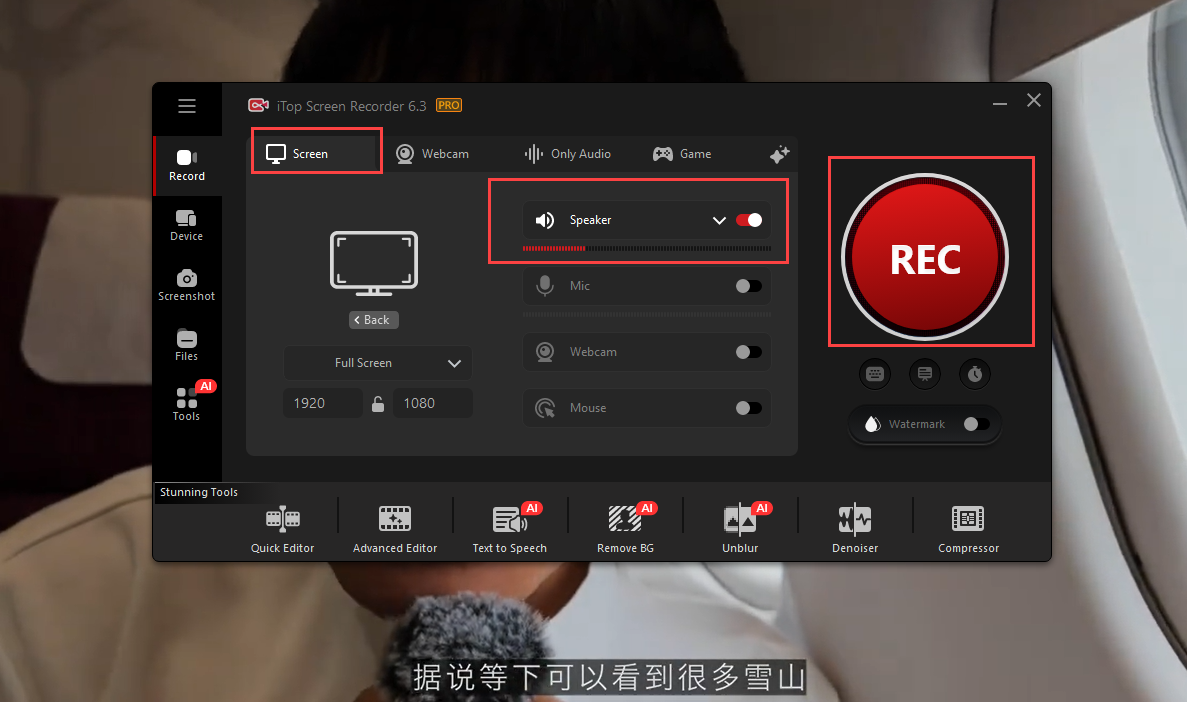
Step 3. Launch iTop Screen Recorder. Click Record > Screen > select recording area. Turn on Speaker to record Douyin video with audio. Click the red REC button.
Tip: You can turn on Webcam and Mic to make a reaction/review video of an interesting Douyin video for social media sharing.
Step 4. After 3 seconds countdown, it automatically start recording and the process bar appears. When the video ends playing, click the Done button on the bar to stop recording.
The recorded video is saved to Files > Video where you can use the inbuilt video editor to enhance your screen recordings effortlessly.
Why use iTop Screen Recorder: As a desktop app, iTop Screen Recorder shows off a stable and reliable process, being not affected by platform restriction and network condition. It is a free screen recorder with no time limit so that you can record long videos (even full movies/shows) and live streams. All details can be kept helping you preserve real-time interactions.
Why not iTop Screen Recorder: It is only available for Windows. You can't stop recording until the video finishes playing to save whole content.
What You Should Be Informed When Downloading Videos from Douyin
Is it legal to download Douyin videos?
It depends. It is completely legal to download Douyin videos from your own account or with creators' permission. Downloading for personal use is usually allowed while downloading for distribution or commercial use is generally illegal for copyright infringement.
Do you need an account to download Douyin videos?
No. It doesn't require an account to download videos from Douyin using all 3 methods recommended here unless the video is only accessible with login.
How to save someone's live stream on Douyin?
iTop Screen Recorder is the best choice to record live streams on Douyin or other platforms on PC. It allows you to capture live videos, audios and chats in real-time with ease. If you want to record Douyin live streams on phones, the built-in screen recorder is the most convenient solution.
Conclusion
Are you interested in China culture and wonder what is popular in China in the era? Discover the trendy and creative content on Douyin. Also, if you want to download Douyin videos, the above-mentioned methods are good solvers. Try the ways and pick out a way to download videos from Douyin you like best.