


iTop Screen Recroder
The Easiest Way to Record Your PC Screen


Buy iTop Screen Record PRO to Enjoy More
Create high-quality screen recordings and save big.
The Easiest Way to Record Your PC Screen
Share


How do I take a screenshot in Telegram private in Android/iPhone devices? iTop Screen Recorder helps screenshot private Telegram HD on phone/PC.
Can you screenshot on private Telegram channel? Yes, you can take a screenshot on Telegram private & secret chats with phone’s built-in capture features. Screenshots private Telegram are blocked? No worries. iTop Screen Recorder allows you to take screenshots on PC/mobile without black screen.
Check how to screenshot private Telegram step by step now!
If you’d like to take a screenshot of restricted private messages on phone, try these methods.
Here’s how to screenshot private Telegram channel on Android & iPhone.
So does it notify if you screenshot private Telegram? It depends. For regular private Private Chats, Groups & Channels: No, Telegram does not notify the other user when you take a screenshot; For Secret Chats and View-Once Media: Yes, Telegram notifies the screenshots.
How to take screenshot in Telegram private channel without them knowing? Simple. iTop Screen Recorder allows you to take a screenshot on Telegram Secret Chats and view-once content without notification & black screen.
It’s an amazing screen recorder for PC/mobile, allowing multi-mode to take screenshots in UHD, including Customize, Full Screen, Active Window, and even Scroll Window.

Record screen, webcam, audio and gameplay with ease. Create high-quality screen recordings with no lags and fps drops.
Follow the simple steps to screenshot Secret Chats and disappearing messages on PC.
Step 1. Free download and install iTop Screen Recorder on PC.
Step 2. Open Telegram desktop or Telegram web. Find your desired content.
Step 3. On the screen recorder, go to “Screenshot” and select a mode, click on the camera icon to take a screenshot without notification.
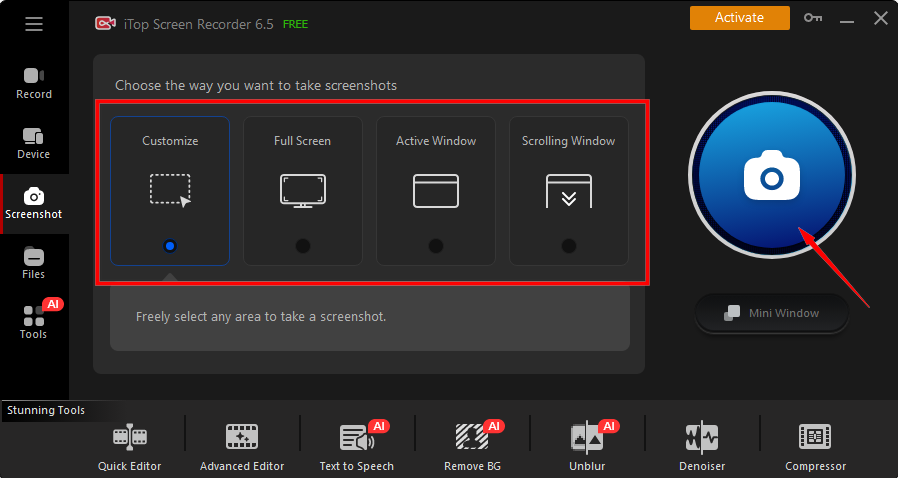
Here’s how to take screenshot on Telegram private channel by mirroring phones:
Step 1. Launch iTop Screen Recorder, go to the “Device” tab.
Step 2. Select your mobile device, for instance, Android.
Step 3. Follow the on-screen guide and start your screenshot on Telegram.
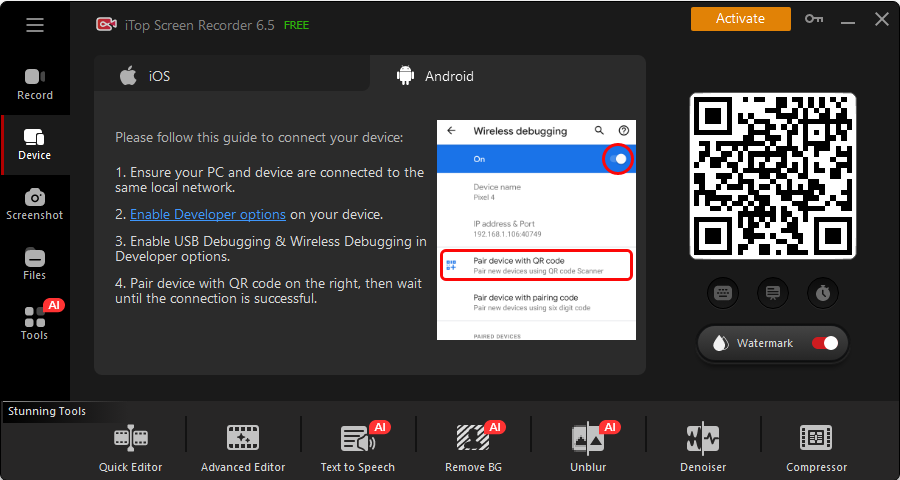
Notice: Please respect other users’ privacy; do not screenshot sensitive content without consent.
How to screenshot private Telegram? If you expect to take high-quality screenshots on private Telegram without anyone knowing, free download iTop Screen Recorder to get started easily!
Yes No
Thanks for your feedback!Share
 Do you have any more questions? Share with us

Invalid email address
 Submitted successfully
 People Also Ask
I’ve got a black screen when taking a screenshot of Telegram. How to bypass Telegram screen block? Can I successfully take a screenshot of Telegram?
Hi, I’d like to view Facebook Story anonymously without appearing on the viewer list. Is that possible, and if so, how can I do it?
Hi, I’d like to hide my identity while viewing Telegram Stories anonymously. Is that possible, and if so, how can I do it? I need a safe method.
Subscribe to Our Newsletter
Subscribe to our newsletter to stay updated every moment.

Subscribe to Our Newsletter
Subscribe to our newsletter to stay updated every moment.
© 2026 iTop. All rights reserved.


