


iTop Screen Recroder
The Easiest Way to Record Your PC Screen


Buy iTop Screen Record PRO to Enjoy More
Create high-quality screen recordings and save big.
The Easiest Way to Record Your PC Screen
Share


Hi, do you guys know I can screenshot Close Friends stories? Will Instagram notify them that I took a screenshot?
Yes, you can screenshot a Close Friends story without the poster receiving a notification. This differs from Direct Messages (DMs)—Instagram sends notifications for screenshots of vanishing photos and videos.
For quick and easy screenshots, using your device's built-in screenshot feature is a smart choice. The process is the same as capturing other content: iPhone users press the side button and volume up button simultaneously; Android users press the power button and volume down button together (the exact combination may vary slightly by device model).
However, if you need to capture scrolling screenshots or perform other editing tasks, we recommend a powerful screenshot software. iTop Screen Recorder does exactly that, making the process effortless for anyone. You can easily record or capture any activity on Instagram (including DMs) on your computer or mobile device.

Record screen, webcam, audio and gameplay with ease. Create high-quality screen recordings with no lags and fps drops.
Step 1. Download and install the software on your computer. Open the Instagram app and navigate to the Close Friends Story page.
Step 2. (Optional) For mobile users, switch to the Device tab, select your target device's operating system, and connect your phone to your computer following the on-screen instructions.
Step 3. Switch to the Screenshot tab and choose your desired capture size. Click the large blue Screenshot icon to start.
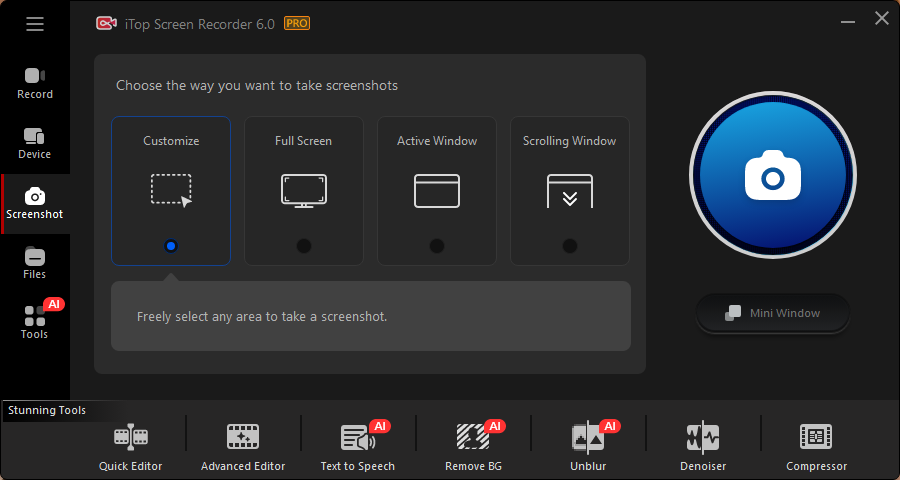
Step 4. Click Save to store the screenshot locally on your device.
Yes No
Thanks for your feedback!Share
 Do you have any more questions? Share with us

Invalid email address
 Submitted successfully
 People Also Ask
I want to know how to take screenshot in FaceApp, but I'm worried there might be restrictions. What should I do? Is there any effective method?
Why can’t I screenshot Disney Plus? It is a black screen. How to screenshot Disney+ without a black screen?
Hi! Do you guys know how to watch Reelshort for free? I don‘t want to spend Money on the app.
Subscribe to Our Newsletter
Subscribe to our newsletter to stay updated every moment.

Subscribe to Our Newsletter
Subscribe to our newsletter to stay updated every moment.
© 2026 iTop. All rights reserved.


