


iTop Screen Recroder
The Easiest Way to Record Your PC Screen


Buy iTop Screen Record PRO to Enjoy More
Create high-quality screen recordings and save big.
The Easiest Way to Record Your PC Screen
Share


How can I download content from Pluto TV? Is there any way to download stream movies on Pluto TV for free? Please recommend some proven methods.
Can you download on Pluto TV? No, you can’t download videos directly from Pluto TV for offline viewing. The official Pluto TV apps and web player are only capable of streaming live TV and on-demand content. There is no native download option for offline viewing on any device, including desktop browsers, mobile apps, or smart TV apps. It's a restriction on how Pluto TV controls content access and copyright.
Since there is no built-in download function, you’ll find several third-party “Pluto TV downloaders” claiming to allow you download Pluto TV content to your PC. They function by scraping or grabbing the stream but are not endorsed by Pluto TV and may hold some legal or technical risks. Some solutions require the download and installation of third-party software, which simulates the playback and then exports the files like MP4 or MKV, but they still do not work within the terms of service of Pluto TV.
If you are looking to download Pluto TV content for offline viewing or personal use without depending on uncertain downloader apps, one great option is screen recording. On Windows, iTop Screen Recorder is a good choice. It allows you to record protected videos and anything that you play on screen, including streams from Pluto TV, and save it as a video file that you can play later. It’s free and simple to use:
1. Open the iTop Screen Recorder. Choose the recording area.

Record screen, webcam, audio and gameplay with ease. Create high-quality screen recordings with no lags and fps drops.
2. Play the Pluto TV content you want to save, and press REC to start screen capture.
3. Stop and export the recording when you’re done.
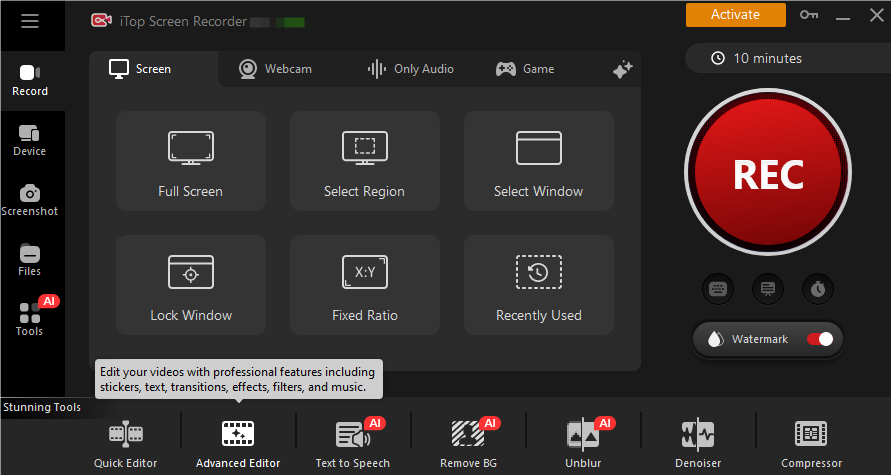
Keep in mind that screen capturing of Pluto TV should comply with copyright and license agreements: capture only for your own use, and don't redistribute the captured content.
Yes No
Thanks for your feedback!Share
 Do you have any more questions? Share with us

Invalid email address
 Submitted successfully
 People Also Ask
Hi! Do you guys know how to watch Reelshort for free? I don‘t want to spend Money on the app.
I want to watch Udemy courses offline. Can I download Udemy videos to watch later? How to download Udemy videos for offline viewing on PC?
How to watch age restricted videos on YouTube? Can I watch age restricted YouTube videos without signing in?
Learn how to identify music in YouTube videos using simple tools. Find out how to identify songs in YouTube videos quickly - even without lyrics.
Want to watch a previous Twitch VOD, but find it has been deleted. Can I watch deleted Twitch VODs? Where to find deleted Twitch VODs and how to download them?
Can I record Chaturbate? How to record Chaturbate videos or streams hassle free? Any solution is appreciated.
Subscribe to Our Newsletter
Subscribe to our newsletter to stay updated every moment.

Subscribe to Our Newsletter
Subscribe to our newsletter to stay updated every moment.
© 2026 iTop. All rights reserved.


