


iTop Screen Recroder
The Easiest Way to Record Your PC Screen


Buy iTop Screen Record PRO to Enjoy More
Create high-quality screen recordings and save big.
The Easiest Way to Record Your PC Screen
Share


How to record live TV without cable? This article has 3 ways to talk about the most actionable solutions with detailed responding guides.
How to record live TV without cable? There are 3 reliable and actionable ways that can help. Check them out below.
This way is ideal for how to record broadcast TV without cable while maintaining high video quality.
Quick guide:
Step 1. Get an OTA antenna. It lets you watch free local channels like ABC, CBS, NBC, FOX, and PBS.
Step 2. Plug the antenna into a DVR device (Tablo, HDHomeRun, or Amazon Fire TV Recast) and the DVR into your router.
Step 3. Use the DVR's app to scan for channels and schedule recordings
Step 4. Access live TV and recordings on your smart TV, phone, or tablet within your home network.
Part of streaming platforms like YouTube TV, Hulu+ Live TV, and Sling TV enables you to record live channels directly to the cloud.
Quick guide:
Step 1. Sign up for a streaming service, e.g., YouTube TV, and download its app to your smart TV or phone.
Step 2. Access the shows you want in the guide and select “add to library”; otherwise, click the record icon to capture it. It will be auto-saved to the cloud.
Except for streaming on TV or phones, you can stream live TV on computers and screen record live TV without cable using free recording software like iTop Screen Recorder.

Record screen, webcam, audio and gameplay with ease. Create high-quality screen recordings with no lags and fps drops.
Quick Guide:
Step 1. Download iTop Screen Recorder to your Windows PC 7/8/10/11.
Step 2. Open the recorder and set recording preferences like audio, recording area, and storage. Stream the live TV channels on the computer, and click “Rec” to start.
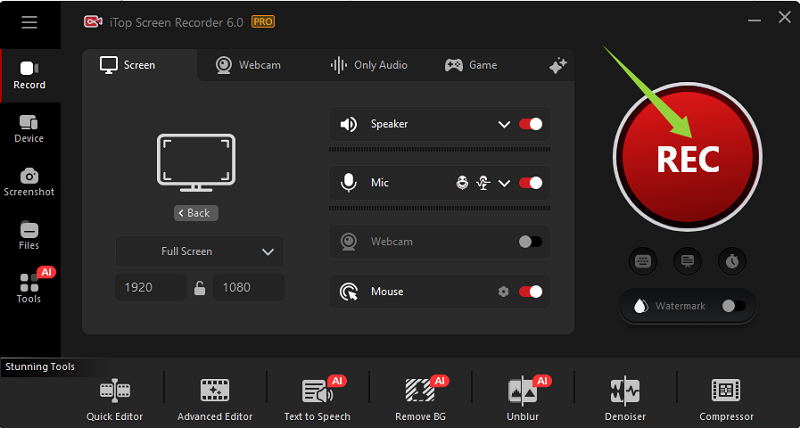
Step 3. Tap the stop icon on the floating bar and go to the files > video and find the recordings.
Those are all effective ways to solve the problem of how I can record live TV without cable. The best choice depends on your budget, technical comfort, and whether you want free broadcast channels or premium live TV streaming.
Obviously, iTop Screen Recorder is the most economic method for how to record live TV without cable.
Yes No
Thanks for your feedback!Share
 Do you have any more questions? Share with us

Invalid email address
 Submitted successfully
 People Also Ask
Learn how to identify music in YouTube videos using simple tools. Find out how to identify songs in YouTube videos quickly - even without lyrics.
Want to watch a previous Twitch VOD, but find it has been deleted. Can I watch deleted Twitch VODs? Where to find deleted Twitch VODs and how to download them?
Can I save or download a photo from Threads? Does Threads notify when you save a photo that someone posts?
I'm trying to screenshot a moment from my favorite HBO Max show, but all I get is a black image. Why does this happen, and how to screenshot HBO Max?
Subscribe to Our Newsletter
Subscribe to our newsletter to stay updated every moment.

Subscribe to Our Newsletter
Subscribe to our newsletter to stay updated every moment.
© 2026 iTop. All rights reserved.


