


iTop Screen Recroder
The Easiest Way to Record Your PC Screen
 Vidnoz AI creates engaging videos with realistic AI avatars. Free, fast and easy-to-use.
Try for Free >
Vidnoz AI creates engaging videos with realistic AI avatars. Free, fast and easy-to-use.
Try for Free >
The Easiest Way to Record Your PC Screen
Share


I’m wondering if I can download a rented movie on YouTube to watch later? Can I save the rented movie to my local folder?
Yes. You can download a rented movie from YouTube on the YouTube Movies & TV service for offline viewing, but with some important caveats. According to YouTube’s official, when you rent a movie or TV show episode, you may download it via the YouTube App on supported iOS and Android devices and view it offline during the rental period.
Follow these steps to download a rented movie on YouTube:
Restrictions
The downloaded rented movie is only for offline viewing via the YouTube app, and you can’t export the file to another player or device outside the app. Moreover, the rental period still applies: once you start watching a rented movie, you usually have a limited window, often 48 hours.
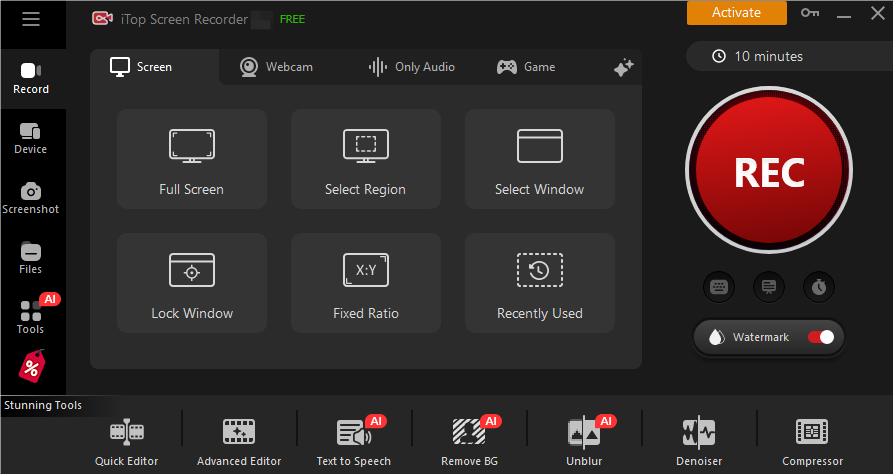
Considering that downloading a rented movie on YouTube has several limitations, we’d rather screen record the rented YouTube movie for further viewing or sharing. iTop Screen Recorder is a powerful free video screen recorder for PC. You can secretly screen record a rented movie on YouTube in high resolution. It has a user-friendly UI, allowing you to screen record the movie with no effort. Just follow these three steps:
1. Download and install iTop Screen Recorder on your PC and launch it.

Record screen, webcam, audio and gameplay with ease. Create high-quality screen recordings with no lags and fps drops.
2. Open the rented YouTube movie. Select Record and choose the window in the iTop Screen Recorder.
3. Press REC to start recording and click the stop button to finish.
Yes No
Thanks for your feedback!Share
 Do you have any more questions? Share with us

Invalid email address
 Submitted successfully
 People Also Ask
Why can’t I screenshot Disney Plus? It is a black screen. How to screenshot Disney+ without a black screen?
Hey guys! Just wanted to know this--how do I download video from Instagram without watermark? Or are there any recommended apps that can do this? Thanks!
How to save a video from Snapchat without getting caught? Discover safe ways to save Snaps, including using iTop Screen Recorder.
Hi! Do you guys know how to watch Reelshort for free? I don‘t want to spend Money on the app.
Where to watch short films online free? Are there any sites out there? I'm looking for some great short films to watch. Thank you in advance!
Check the screen recorder that bypasses the content protection policy set by Stripchat. Record Stripchat for free.
Subscribe to Our Newsletter
Subscribe to our newsletter to stay updated every moment.



Product
iTop VPN iTop Data Recovery iTop Screen Recorder iTop PDF Editor DualSafe Password Manager iTop Easy Desktop Plans & PricingCompany
About Us Contact Us Press Awards FacebookHelp
Support Uninstall Instructions Refund PolicyPartner
Become iTop Affiliate YouTube Creators Free AI Video Generator
Subscribe to Our Newsletter
Subscribe to our newsletter to stay updated every moment.
© 2025 iTop. All rights reserved.


